RSS Feeds
It is now possible to "subscribe" to Home Recording Connection content with some RSS/XML formatted news feeds with any RSS compatible application that you may use. The following feeds are available:
| HRC News: |  |
 |
|||
| All Forums: | |
|
|||
| > | Recording Forums: | |
|
||
| > | Gear Gab Forums: | |
|
||
| > | Music & Composition Forums: | |
|
||
| > | Talkin' Smack Forums: | |
|
||
| > | Computers & Software Forums: | |
|
||
| > | Sampling & Field Recording Forums: | |
|
||
| > | Live Sound Reinforcement Forums: | |
|
||
| > | Mixing Forums: | |
|
||
| > | Mastering Forums: | |
|
||
The number at the end of each URL can be changed to reflect how many headline you want to get back.
Need an RSS Reader?
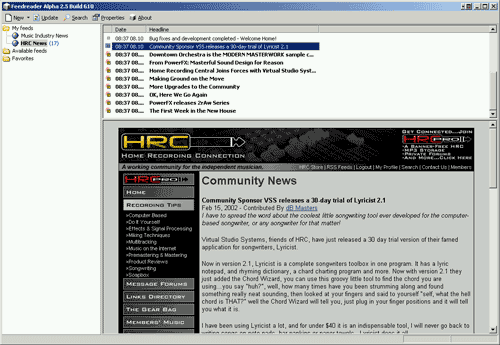
If you do not currently have an RSS News Reader, but would like to have this news on your desktop, there are several available on the internet. One such application is FeedReader. FeedReader is a freeware tool that is available for free.
To add a news feed, open FeedReader and click the "News" button, which will pop up the window shown below:

Just fill in the URL of the feed you want to use in the form field, click "Next" and you are done.
Then in the main window of the program, highlight the feed that you want to see, then double click the headline you want to view and it will appear in the lower right pane of the window as shown below: